
Introduction

Let me be straight with you.
When I first typed "how to start bug bounty hunting" into Google, I got overwhelmed fast. Dozens of roadmaps, hundreds of YouTube videos, conflicting advice everywhere. Some people said "learn coding first." Others said "just start hacking." Nobody gave me a clear, honest, step-by-step path.
So I figured it out the hard way — through trial, error, rejected reports, and a lot of late nights staring at Burp Suite.
And then one day, the notification came. A payout. My first real bounty. Then another. Then another. Until I crossed $1,000.
This blog is the guide I wish I had when I started. Whether you're a complete beginner who doesn't know what XSS means, or someone who's been "about to start" bug bounty for six months — this is for you.
What you'll learn in this guide:
- What bug bounty hunting actually is and how the money works
- The exact skills and tools you need (nothing extra)
- How to understand vulnerabilities without a CS degree
- A real recon and hunting methodology
- How to write reports that get paid
- The honest lessons from my first $1,000
⚠️ Important Disclaimer: Everything in this guide is for ethical, legal hacking only. Never test systems you don't have explicit permission to test. Bug bounty programs give you that permission — stay inside their scope, always.
What Is Bug Bounty Hunting? (And Why Companies Pay You)

1.1 The Bug Bounty Ecosystem Explained
Here's the simple version: Companies build software. Software has bugs. Some of those bugs are security vulnerabilities — weaknesses that attackers can exploit to steal data, take over accounts, or break systems.
Instead of waiting for the bad guys to find those bugs, smart companies invite ethical hackers like you and me to find them first — and they pay us for it.
That's bug bounty hunting.
The ecosystem has three players:
- The Company (Target): Wants to secure their systems. Offers rewards for valid vulnerability reports.
- The Platform: Middlemen like HackerOne, Bugcrowd, and Intigriti that connect hackers with companies, manage reports, and handle payouts.
- The Hunter (You): Finds vulnerabilities ethically, reports them professionally, gets paid.
The bug bounty industry has paid out hundreds of millions of dollars to security researchers worldwide. Companies like Google, Meta, Microsoft, and Apple all run active programs. Some bounties pay $500. Some pay $50,000+. The range is wide — but even at the lower end, it's real money for real skills.
1.2 Responsible Disclosure vs. Bug Bounty Programs
Before you start hunting, you need to understand two terms that are often confused:
Vulnerability Disclosure Program (VDP): A company accepts bug reports but offers no monetary reward. You get credit, recognition, and sometimes a Hall of Fame mention. Good for building a reputation, not a bank account.
Bug Bounty Program (BBP): A company accepts bug reports AND pays cash rewards based on the severity of the vulnerability. This is what we're focused on.
⚠️ Critical Warning for Beginners:
- Always read the program's scope before testing. Scope defines what you're allowed to test.
- Testing out-of-scope assets — even accidentally — can get your account banned or worse, result in legal consequences.
- Never share vulnerability details publicly before the company fixes them. This is called responsible disclosure — and violating it is both unethical and potentially illegal.
The golden rule: If you don't have permission, you don't touch it.
1.3 Top Bug Bounty Platforms to Know
| Platform | Best For | Avg Payout Range | Beginner-Friendly |
|---|---|---|---|
| HackerOne | Wide range of programs | $100 – $10,000+ | ✅ Yes |
| Bugcrowd | Enterprise programs | $150 – $5,000+ | ✅ Yes |
| Intigriti | European companies | $100 – $20,000+ | ✅ Yes |
| Synack | Invite-only, vetted hackers | $500 – $50,000+ | ❌ No |
| YesWeHack | Global programs | $100 – $15,000+ | ✅ Yes |
Start with HackerOne or Bugcrowd. They have the largest number of public programs, beginner-friendly documentation, and active communities. Create your profile, verify your identity, and start exploring programs before you even start hunting.
Building Your Foundation — The Skills You Actually Need
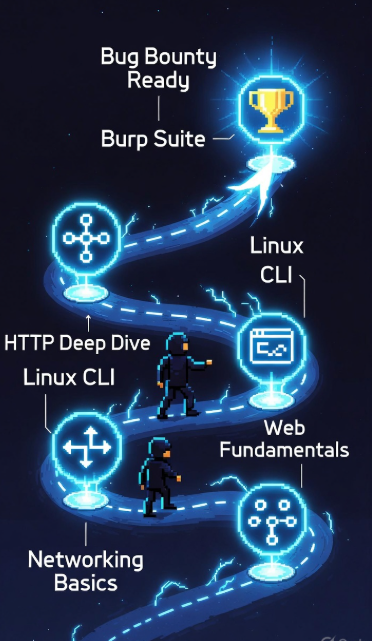
2.1 The Bug Bounty Skill Stack (Roadmap)
One of the biggest mistakes beginners make is jumping straight into hacking without a foundation. You don't need to be a software engineer. You don't need a degree. But you do need to understand certain basics before the tools and techniques will make sense.
Here's the honest beginner skill checklist:
✅ Networking Basics
- Understand IP addresses, DNS, ports, and protocols (TCP/IP, HTTP, HTTPS)
- Know what a request and response look like
- Understand what a firewall and WAF (Web Application Firewall) do
✅ Web Fundamentals
- How websites work (client-server model)
- What HTML, JavaScript, and forms do at a basic level
- Cookies, sessions, and authentication flow
✅ Linux Command Line
- Navigate the file system
- Run tools from the terminal
- Pipe commands and read output
✅ HTTP Deeply
- GET vs POST requests
- Headers (Host, Cookie, Authorization, Content-Type)
- Status codes (200, 301, 403, 404, 500)
- How parameters work in URLs and request bodies
✅ Burp Suite Basics
- Intercept and modify requests
- Use the Repeater and Scanner
- Understand proxy setup
You don't need to master all of this before starting — but you need enough to not be lost when you open Burp Suite for the first time.
Resources to build this foundation:
- PortSwigger Web Academy (free, world-class, covers everything)
- TryHackMe — beginner-friendly, gamified learning
- PentesterLab — web-focused, great for bug bounty prep
2.2 Must-Know Web Concepts Before You Hunt
Think of a website like a restaurant.
The frontend (what you see) is the dining area. The backend (the server) is the kitchen. The HTTP request is your order, and the HTTP response is the food that comes back.
Now imagine if a customer could walk into the kitchen, change their order ticket, and get someone else's food — that's basically what IDOR (Insecure Direct Object Reference) is. We'll get to that.
Here's a quick reference for terms you'll see constantly:
| Term | What It Means |
|---|---|
| HTTP Request | Message your browser sends to a server |
| HTTP Response | What the server sends back |
| Cookie | Small data stored in your browser to track sessions |
| Session Token | Proof that you're logged in |
| Header | Extra metadata attached to requests/responses |
| Parameter | Variable in a URL or request body (e.g., ?id=5) |
| Endpoint | A specific URL/path on a web application |
| API | Interface that lets apps communicate with each other |
Once you understand these, vulnerabilities start to make sense logically — not just as jargon.
2.3 Tools Every Bug Bounty Hunter Needs
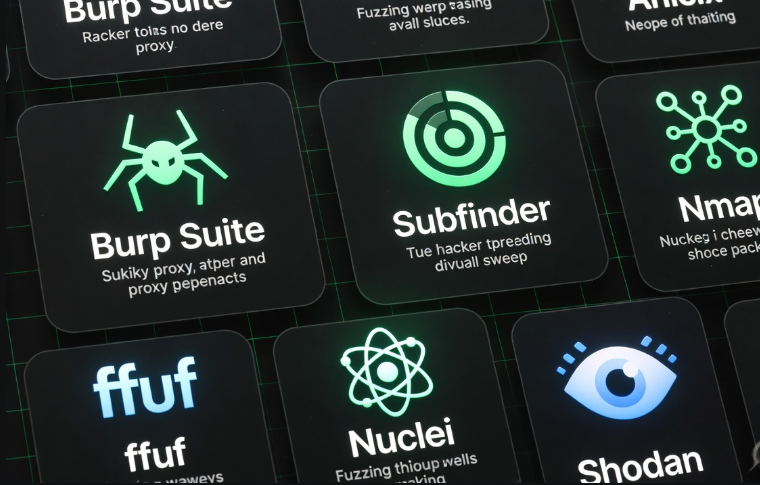
You don't need 50 tools. You need the right ones, used well.
| Tool | Purpose | Free/Paid | Skill Level |
|---|---|---|---|
| Burp Suite Community | Intercept, modify, replay HTTP requests | Free (Community) | Beginner |
| Subfinder | Subdomain enumeration | Free | Beginner |
| httpx | Check which subdomains are alive/responsive | Free | Beginner |
| ffuf | Fuzzing directories, parameters, subdomains | Free | Intermediate |
| Nmap | Port scanning, service detection | Free | Intermediate |
| Nuclei | Automated vulnerability scanning with templates | Free | Intermediate |
| Amass | Deep subdomain and asset discovery | Free | Intermediate |
| Shodan | Find internet-exposed assets and services | Free/Paid | Intermediate |
Start with Burp Suite + Subfinder + httpx. These three alone will carry you through your first several months of hunting.
Understanding Vulnerabilities — The OWASP Top 10 for Hunters
3.1 Why OWASP Top 10 Is Your Bug Bounty Bible
OWASP stands for Open Web Application Security Project. Every year (roughly), they publish a list of the top 10 most critical web application security risks. It's based on real-world data from thousands of applications.
Here's why it matters for you: the vast majority of paid bounties trace back to vulnerabilities in the OWASP Top 10.
This isn't a coincidence. These are the most common, most impactful, and most reproducible classes of bugs in web applications. If you learn these well, you have a roadmap to every program you'll ever hunt on.
Don't try to learn every hacking technique under the sun. Learn the OWASP Top 10 deeply. That's the cheat code for beginners.
3.2 The High-Value Vulnerabilities Beginners Should Focus On
Not all OWASP vulnerabilities are equally beginner-accessible. Here are the ones that will give you the best return on learning time:
| Vulnerability | Difficulty | Avg Payout Range | Where to Find It |
|---|---|---|---|
| IDOR (Insecure Direct Object Reference) | Low | $100 – $5,000 | APIs, user profiles, order IDs |
| XSS (Cross-Site Scripting) | Low–Medium | $100 – $3,000 | Input fields, search bars, URL params |
| Open Redirect | Low | $50 – $500 | Login redirects, URL parameters |
| SSRF (Server-Side Request Forgery) | Medium | $500 – $10,000+ | File upload, URL fetching features |
| Broken Authentication | Medium | $300 – $8,000 | Login flows, password reset, MFA bypass |
| SQLi (SQL Injection) | Medium–High | $500 – $25,000+ | Search, login, any DB-connected input |
Start with IDOR and XSS. They're the most commonly found bugs by beginners, have a lower learning curve, and are present in a huge number of programs. Once you're comfortable, move up to SSRF and Broken Auth.
Quick explanations:
- IDOR: You're user ID 1001. Change the ID in a request to 1002. Can you see someone else's data? That's IDOR.
- XSS: You enter <script>alert(1)</script> in a search bar. The page runs it. Now imagine that script steals session cookies. That's XSS.
- Open Redirect: A login page redirects you to ?next=https://google.com. Can you change it to ?next=https://evil.com? That's an open redirect — and it enables phishing.
3.3 Understanding Impact: Why Severity Determines Your Payout
Here's something most beginners don't understand: finding a bug is only half the job. Proving its impact is the other half.
Bug bounty programs use a severity scale, often based on CVSS (Common Vulnerability Scoring System):
| Severity | Score Range | Example | Typical Payout |
|---|---|---|---|
| Critical (P1) | 9.0 – 10.0 | Account takeover, RCE | $3,000 – $50,000+ |
| High (P2) | 7.0 – 8.9 | SSRF with internal access, SQLi | $1,000 – $10,000 |
| Medium (P3) | 4.0 – 6.9 | Stored XSS, IDOR on sensitive data | $300 – $2,000 |
| Low (P4) | 0.1 – 3.9 | Open redirect, self-XSS | $50 – $500 |
| Informational (P5) | N/A | Missing headers, best practice issues | $0 – $100 |
💡 Pro Tip: When you find a bug, ask yourself: "What's the worst thing an attacker could do with this?" That's your impact statement. The more damage it can enable, the higher the severity — and the higher the payout.
Don't just report "I found an XSS." Report "I found a stored XSS in the profile bio field that can be used to steal session cookies of any user who views the victim's profile, enabling full account takeover." That's a P2, not a P4.
🔐 Enjoying this guide so far? Join thousands of ethical hackers learning and growing together. Come find us at bugitrix.com or jump into the conversation on our Telegram community. We share tips, program recommendations, and real-world writeups every week.
Recon — The Skill That Separates $0 Hunters from $1,000+ Hunters
4.1 What Is Recon and Why Most Beginners Skip It
Recon — short for reconnaissance — is the process of mapping out your target before you start testing. It's the difference between wandering into a building blind and having a full floor plan before you walk in.
Most beginners skip recon because it feels boring. There's no instant gratification. You're not "hacking" yet. So they jump straight into testing the main domain, poke around for an hour, find nothing, and quit.
That's the wrong approach.
Here's the truth: the best hunters spend 60–70% of their time on recon. Because the bugs that pay well are usually not on www.target.com. They're on legacy-api.target.com, admin.internal.target.com, or a forgotten subdomain running an old version of software nobody has touched in two years.
Passive Recon: Gathering information without touching the target's systems — using public data, search engines, certificate logs, and third-party databases.
Active Recon: Directly interacting with the target — DNS lookups, port scanning, subdomain brute-forcing. Always confirm this is within program scope first.
4.2 Subdomain Enumeration and Asset Discovery
Your goal in recon is to find every asset the company owns that falls within scope. More assets = more attack surface = more opportunities.
Tools and techniques:
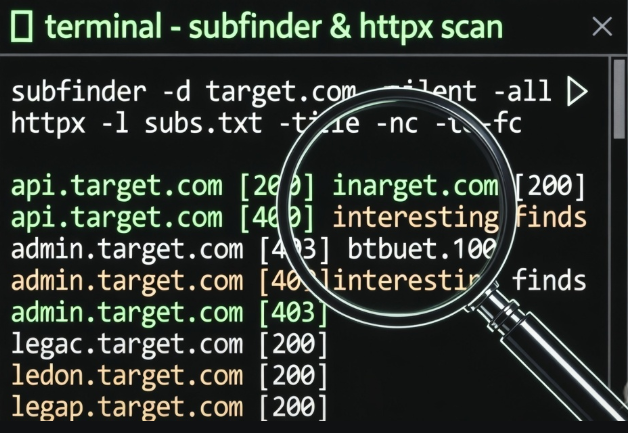
Subfinder — passive subdomain discovery using public sources
subfinder -d target.com -o subdomains.txt
Amass — deeper enumeration using multiple data sources
amass enum -passive -d target.com
crt.sh — certificate transparency logs. Go to https://crt.sh/?q=%.target.com and see every SSL certificate ever issued for the domain. Goldmine.
httpx — check which discovered subdomains are actually alive
cat subdomains.txt | httpx -status-code -title -o live_hosts.txt
Shodan — search for the company's IP ranges and see what ports and services are exposed to the internet. Even the free version reveals a lot.
After this process, you'll often have hundreds of subdomains. Now you have real targets — not just the homepage everyone else is looking at.
4.3 Building Your Personal Recon Methodology
The hunters who earn consistently aren't lucky. They're systematic. Here's a beginner recon checklist to run on every new target:
✅ Identify all in-scope domains and subdomains
✅ Run Subfinder + Amass for passive subdomain enumeration
✅ Check crt.sh for certificate transparency data
✅ Run httpx to identify live hosts
✅ Check each live host for: title, status code, technologies used (Wappalyzer, whatweb)
✅ Look for login pages, admin panels, API endpoints
✅ Check Wayback Machine (web.archive.org) for old endpoints and parameters
✅ Run ffuf for directory and endpoint fuzzing on interesting targets
✅ Search GitHub for leaked credentials, API keys, or source code (site:github.com target.com)
✅ Note down any subdomains running outdated software or interesting tech stacks
Create a folder for each target. Keep notes. Document everything. Recon isn't a one-time thing — revisit it as programs add new assets.
Hunting Your First Bug — A Real-World Walkthrough
5.1 Choosing Your First Target (Program Selection Strategy)
The program you pick as your first target matters more than most beginners realize. Pick the wrong one and you'll spend weeks finding nothing, get discouraged, and quit. Pick the right one and you'll find something within days.
Checklist for choosing a beginner-friendly program:
✅ Wide scope — programs that include *.target.com rather than just www.target.com
✅ Active response rate — check the program's average response time on HackerOne/Bugcrowd (aim for under 5 days)
✅ Low competition signals — newer programs, less-hyped companies in non-tech industries
✅ No rate limiting on reports — some programs cap how many reports you can submit
✅ Clear scope and rules — vague scope = frustration for beginners
✅ Rewards for medium and low findings — some programs only pay for P1/P2; as a beginner you'll find more P3/P4
Avoid as a beginner:
- Programs from massive tech giants (Google, Apple, Facebook) — extremely competitive, high bar
- Programs with very narrow scope (just one feature or endpoint)
- Private programs (you need invites — earn those later)
5.2 A Step-by-Step Bug Hunting Workflow
Here's the repeatable workflow I use on every target. This is what turned random clicking into consistent results.
Step 1: Recon Run your full recon checklist. Map all assets. Find live hosts. Identify interesting tech.
Step 2: Application Mapping On your most interesting targets, manually browse the application. Create an account. Use every feature. Note all endpoints, parameters, and actions. Intercept traffic with Burp Suite to see what's happening under the hood.
Step 3: Identify Potential Weak Points Look for:
- Parameters that reference IDs, user data, or objects (IDOR territory)
- Input fields that reflect data back to the page (XSS territory)
- URL parameters that redirect users (open redirect territory)
- File upload features, URL-fetching features (SSRF territory)
- Password reset flows, login mechanisms (broken auth territory)
Step 4: Test and Verify Don't report something just because it looks weird. Confirm it's actually exploitable. Reproduce it multiple times. Understand exactly what's happening and why it's a security issue.
Step 5: Document Everything Screenshots, request/response captures from Burp Suite, step-by-step reproduction notes. You need this for your report.
Step 6: Write and Submit Your Report
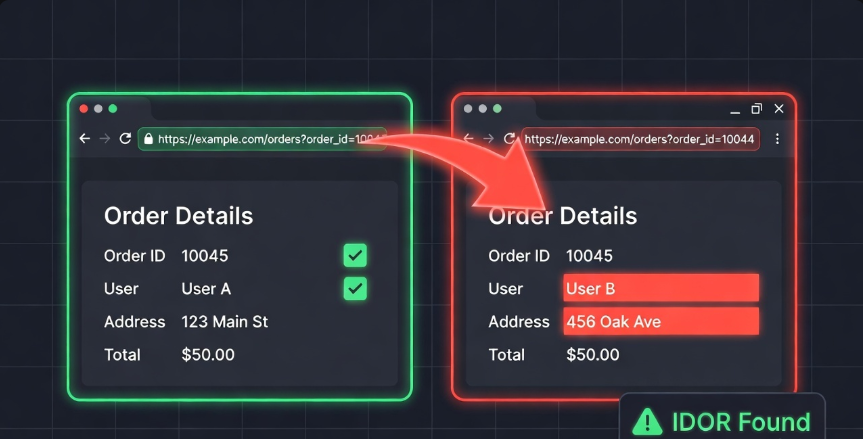
💻 Quick Example — Finding an IDOR:
You're testing a shopping application. After placing an order, the confirmation page URL looks like this: https://shop.target.com/orders?order_id=10045
You're logged in as User A. You change order_id=10045 to order_id=10044. You can now see User B's order details — their name, address, and purchase information. That's an IDOR. That's a real bug. That's potentially a P2 or P3 depending on the sensitivity of the data exposed.
5.3 Writing a Bug Report That Gets Paid (Not Ignored)
A weak report on a great bug = low payout or rejection. A strong report on a medium bug = full payout and reputation points.
The anatomy of a great bug report:
Title: Clear, specific, and severity-indicating
- ❌ Bad: "IDOR found"
- ✅ Good: "IDOR in /orders endpoint allows authenticated users to view other users' order details and PII"
Severity: Choose based on real impact, not hope. Use the CVSS framework as a guide.
Description: 2–3 sentences explaining what the vulnerability is and why it exists.
Steps to Reproduce:
- Log in as User A
- Place an order and note the order_id in the URL
- Log in as User B (second account) in another browser
- As User A, change the order_id to User B's order ID
- Observe that User A can view User B's full order details
Impact: What can an attacker do with this? Who is affected? What data is exposed?
Proof of Concept (PoC): Screenshots, HTTP requests from Burp Suite, screen recording if needed.
Suggested Fix: Optional but appreciated — shows professionalism.
⚠️ Common Report Mistakes That Kill Your Payout:
- Reporting self-XSS (only affects yourself, not others — not a valid bug on most programs)
- Reporting issues that require physical access to a device
- Skipping the impact section entirely
- Typos and unclear steps — triagers are humans, make their job easy
- Reporting out-of-scope assets
- Submitting duplicate reports without checking if it's already known
My First $1,000 — Lessons, Mistakes, and What I'd Do Differently

The Honest Story
My first paid bounty wasn't some mind-blowing zero-day. It was an IDOR. A simple, textbook IDOR on a mid-sized e-commerce platform. I changed a number in a URL, accessed another user's data, documented it carefully, and submitted a clean report.
Payout: $350.
I stared at the notification for about five minutes.
Then I went back and found two more bugs on the same program. An open redirect and a reflected XSS in a search parameter. Another $200 and $300.
That was $850 from one program in about three weeks. A few smaller bugs elsewhere crossed me over $1,000.
What Actually Worked
Focusing on one program deeply instead of bouncing between dozens. I knew that application inside and out. I understood its features, its patterns, its logic. That familiarity is what revealed the bugs.
Doing proper recon first. The IDOR wasn't on the main domain. It was on a subdomain I found through Subfinder that most hunters probably hadn't looked at.
Writing clean reports. My first report got a "Nice report, paying in full" response from the triage team. Presentation matters.
Learning from every rejection. I had three reports rejected before my first success. Each rejection taught me something — about scope, about impact, about severity judgment.
What I'd Do Differently
Start with PortSwigger Web Academy sooner. I wasted weeks watching YouTube videos when I could have been doing hands-on labs that actually built muscle memory.
Join a community earlier. Bug bounty can feel lonely. Finding a community of people on the same journey changes everything — you learn faster, stay motivated, and discover programs and techniques you'd never find alone.
Stop chasing P1s as a beginner. I spent two weeks trying to find RCE and got nowhere. The P3s and P4s I ignored during that time would have paid me faster and taught me more.
The Mindset That Makes the Difference
Bug bounty hunting is not a lottery. It's a skill. And like any skill, it rewards consistency, curiosity, and methodology over luck.
The hunters who make real money aren't necessarily the most technical people in the room. They're the most systematic. They have a process. They document everything. They learn from every program, every report, every rejection.
You don't need to be elite to earn your first $1,000. You need to be focused, patient, and willing to learn from failure.
Conclusion: Your Journey Starts Now
Here's the complete path, summarized:
Build the foundation → Networking, web basics, Linux CLI, HTTP deeply, Burp Suite basics
Learn the vulnerabilities → OWASP Top 10, focus on IDOR, XSS, Open Redirect to start
Master recon → Subfinder, httpx, crt.sh, Shodan — map the attack surface before touching anything
Choose the right target → Wide scope, active programs, avoid big tech as a beginner
Hunt with a methodology → Recon → Map → Identify → Test → Document → Report
Write reports that get paid → Clear title, strong impact statement, clean reproduction steps, PoC
Stay consistent → One program deeply beats ten programs shallowly
The first $1,000 is not the finish line. It's proof that the process works. It's the moment bug bounty stops being a dream and becomes a skill set you own.
Now you have the map. Go hunt.

🔐 Ready to level up your bug bounty journey?
Join the Bugitrix community — where ethical hackers, beginners, and security professionals share knowledge, program tips, and real-world writeups.
💬 Telegram Community: t.me/bugitrix
🌐 Website & Resources: bugitrix.com
🤝 Community Forum: bugitrix.com/forum/help-1
📧 Newsletter: Subscribe at bugitrix.com for weekly bug bounty tips, new program alerts, and writeup breakdowns.
Happy Hunting. Stay ethical. Stay curious. 🔐